
MCP keys and technical details
Last updated: November 18, 2026
For IT teams and developers. What the AI can do, its limits, who is responsible for the AI tool and how to undo a change are in AI tools and MCP .
MCP keys
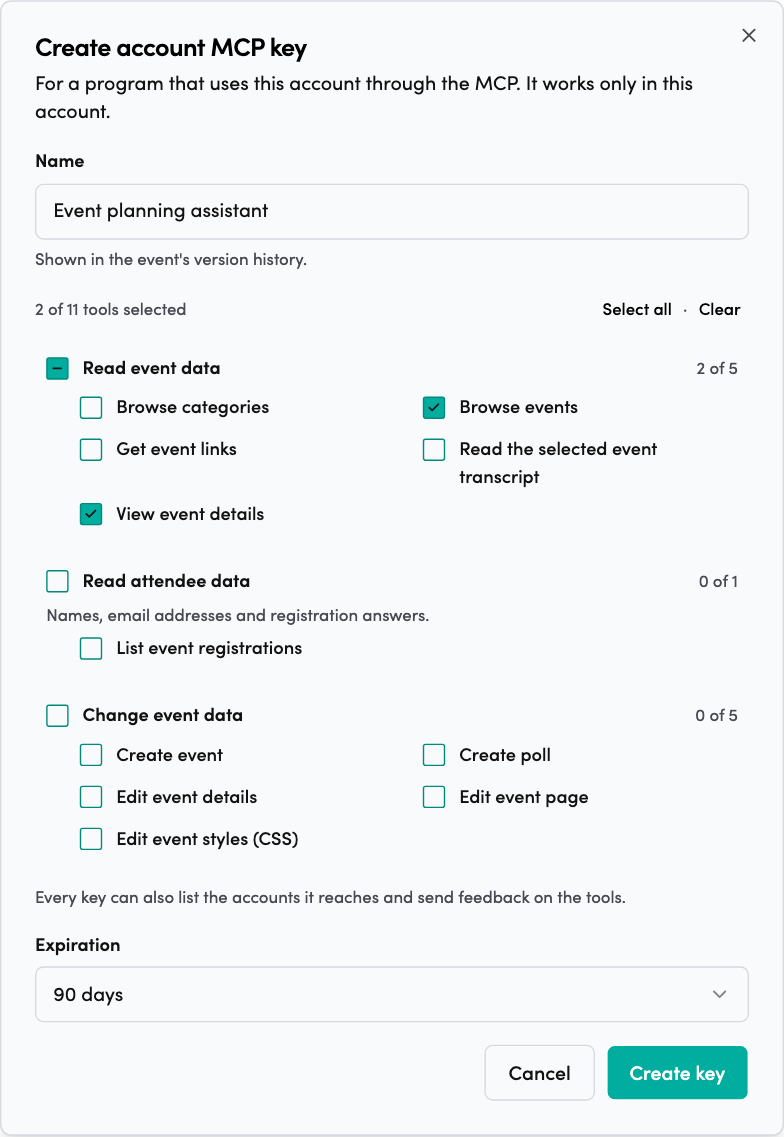
An MCP key lets a program use one account through the MCP with no person signing in. Account admins create keys.
- Click your initials in the top-right corner and choose Settings.
- Under your account’s name, open API & MCP keys.
- In MCP keys, click New key.
- Name the key. The name shows in the event’s version history.
- Tick the tools the key can use. Where Read attendee data is available, grant those tools only to programs that need access to registration information.
- Choose when it expires: 30 days, 90 days or 1 year.
- Click Create key and copy the key. You see it only once.
The program sends the key in the x-apikey header.
An account key works in its own account. The permissions you choose for the key apply independently of the account’s AI apps (MCP) settings.
To change a key’s name or tools, click Edit. To stop a key, click Revoke. Calls with it stop working at once.
New tools aren’t added to a key by themselves. To give a key one, click Edit and tick it.
Everyone with the key acts as the key. Changes show the key’s name, not a person’s. Keep it as safe as a password.
Other AI tools and apps
Any AI tool that can add a remote MCP server with sign-in can connect. Add the MCP URL and sign in when the tool asks. This works with Microsoft Copilot and apps on your computer such as Claude Code and Cursor.
For Claude Code, run:
claude mcp add --transport http videosync https://api.videosync.fi/mcpThen run /mcp in Claude Code and authenticate.
If your tool can’t connect, email support@videosync.fi and tell us which tool it is. We add tools on request.
Technical details
| Item | Value |
|---|---|
| MCP URL | https://api.videosync.fi/mcp |
| Transport | Streamable HTTP |
| Sign-in | OAuth 2.1 with dynamic client registration |
| MCP key | x-apikey header |
| Rate limit | 600 requests per hour per key |
| Request size | Up to 256 KB |